
Generating a guid in Power Automate is quite simple. You only need the guid function and you're good to go.
But what happens if you get a string from somewhere and you want to understand if it's a valid guid or not?
I'll use "Helper Flows" to make things easier and only do this once and use in all my Flows. If you're not familiar please check here for a detailed article.
I'll show you how to do it first and then explain how, in case you're in a hurry.
The solution
Here's the overview of the solution:
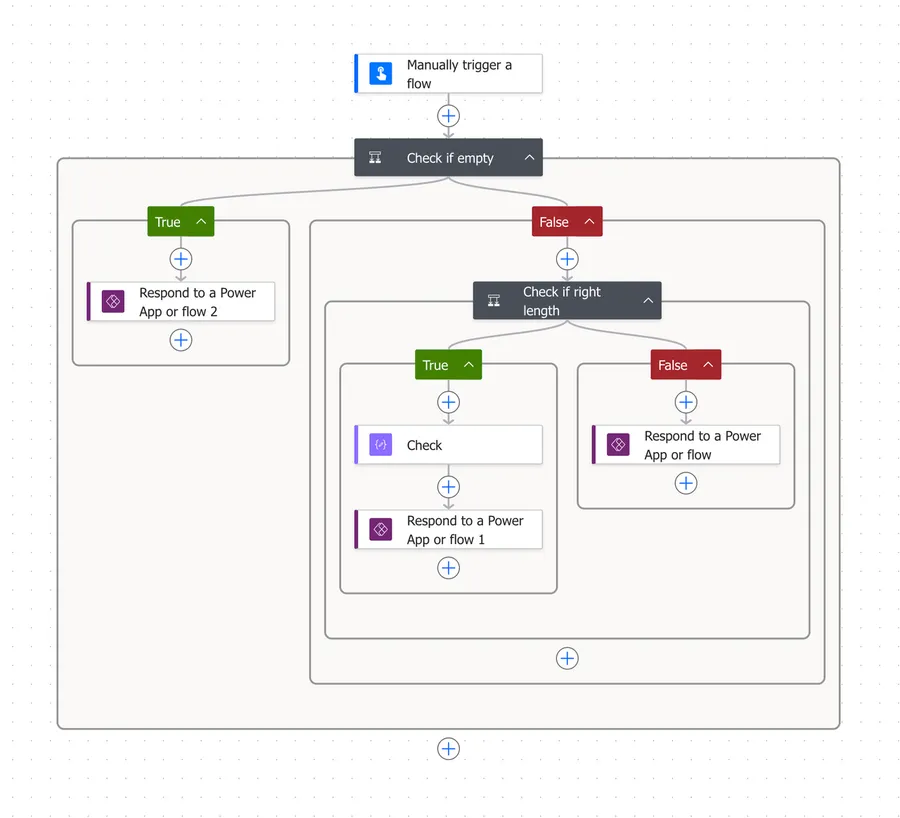
The solution has 3 parts.
- Validates if the string that we get is empty or not. If it is then we stop
- Check if the guid has the correct structure
- Check if the format is correct.
I'm aware that there are multiple types of uuids, but I'm focusing on the format "294CB562-773E-4DF5-9FAD-10712EBC4381" for example.
The solution that I found isn't beautiful but it's working fine and it's the most reliable that I found until now.
and(
    equals(length(triggerBody()?['text']), 36),
    equals(substring(triggerBody()?['text'], 8, 1), '-'),
    equals(substring(triggerBody()?['text'], 13, 1), '-'),
    equals(substring(triggerBody()?['text'], 18, 1), '-'),
    equals(substring(triggerBody()?['text'], 23, 1), '-'),
    empty(trim(
        replace(replace(replace(replace(replace(replace(
        replace(replace(replace(replace(replace(replace(
        replace(replace(replace(replace(replace(
            toLower(triggerBody()?['text']),
        '-', ''), '0', ''), '1', ''), '2', ''), '3', ''), '4', ''),
        '5', ''), '6', ''), '7', ''), '8', ''), '9', ''), 'a', ''),
        'b', ''), 'c', ''), 'd', ''), 'e', ''), 'f', '')
    ))
)
You can copy the function in the "check" and then use a simple bool function to get your answer (is valid or not).
If you're curious on how it works let's dig deeper.
How it works
So as I mentioned it's based on 3 parts.
Step 1: Check if it's empty
The first one is a simple condition action where we check if the value is empty or null.
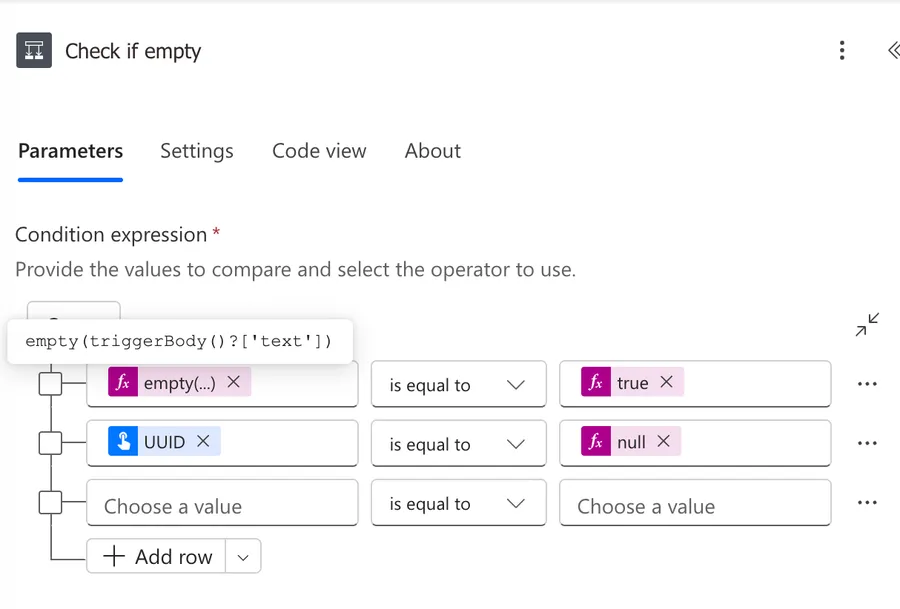
It's important to be sure that the value is not null. You probably can't see in the screenshot but the condition is an "OR" so if either of them is true, the Flow will fail right away and won't proceed.
Step 2: Check if we have the correct number of characters
The second one is to check if we have 36 characters.
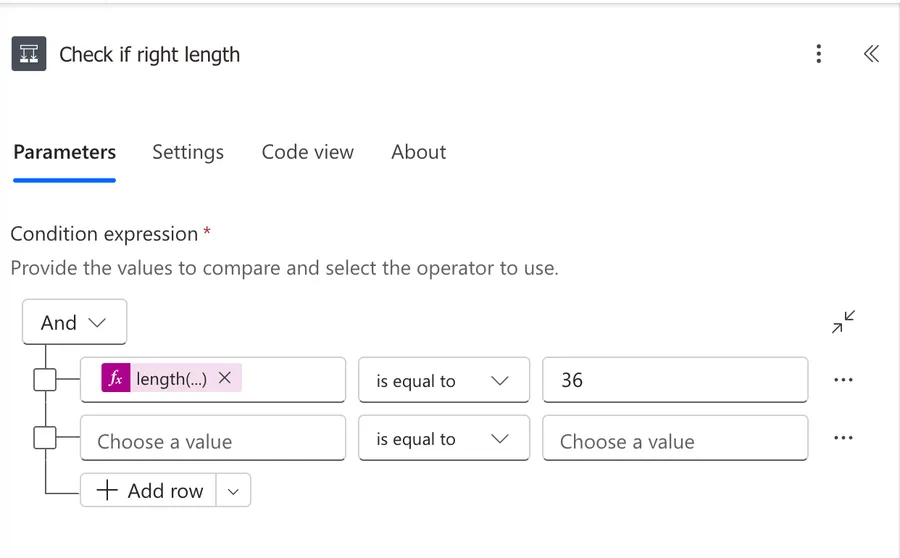
Here's the expression.
length(trim(coalesce(triggerBody()['text'],'')))
Notice that we're using 3 functions.
The length function is easy enough to understand since it's our main objective but why wrap it into a trim and coalesce.
We want to prevent cases where we put 36 spaces and it would be validated as correct. Or 35 spaces and any character. We want to be sure that we get at least a valid first set of characters to validate. The trim function requires that the value that we provide is a valid string, so if we provide "null" then it will return an error. The same for the length function so to be sure that things work correctly, we need to wrap it with coalesce function. The function will check first if the value is null and if it's not return it otherwise return an empty string that can then be validated by the other function.
It's a simple distinction and you may even think that your values will always be valid string, but it's good to validate.
Finally if for some reason we have spaces before and after the uuid, we still want to consider it as valid since these spaces won't add anything.
Step 3: The validation
Now comes the "strange formula". I'll copy it here to explain it:
and(
    equals(length(triggerBody()?['text']), 36),
    equals(substring(triggerBody()?['text'], 8, 1), '-'),
    equals(substring(triggerBody()?['text'], 13, 1), '-'),
    equals(substring(triggerBody()?['text'], 18, 1), '-'),
    equals(substring(triggerBody()?['text'], 23, 1), '-'),
    empty(trim(
        replace(replace(replace(replace(replace(replace(
        replace(replace(replace(replace(replace(replace(
        replace(replace(replace(replace(replace(
            toLower(triggerBody()?['text']),
        '-', ''), '0', ''), '1', ''), '2', ''), '3', ''), '4', ''),
        '5', ''), '6', ''), '7', ''), '8', ''), '9', ''), 'a', ''),
        'b', ''), 'c', ''), 'd', ''), 'e', ''), 'f', '')
    ))
)
It looks strange but once you understand the overall strategy you'll see it's not so bad.
There are 6 validations
- 1 length function that will check if we have the right characters
- 4 substring function check if we have "-" in the correct places. Notice that the example "294CB562-773E-4DF5-9FAD-10712EBC4381" has a "-" in the 8th, 13th, 18th and 23rd position (counting starts at zero). This is important for the static structure of the UUID.
- 1 to check if all characters are valid.
For the last one, we could think to check if the characters that we have are valid, but there are a lot of characters that we could include in the validation. So the expression would be huge.
If you're a developer you would think about regular expressions, but unfortunately at the time of writing they are not yet supported. One can only hope.
But we know that for an UUID we can only have numbers, "-" character and letters from "a" to "f". That's a lot easier, so we could remove all those valid characters and see if something remains. If it does then we know that the value is not correct, because there's "stuff" that should not be there.
That's what we're doing with the "replace" function. We're removing the characters that we know that are correct. We're doing first a "toLower" function so that we only need to check the lowercase version of the characters.
Putting all together it's the "and" function that returns true or false if all expressions inside are correct. So if we:
- have the right number of characters
- 4 "-" in the right places
- no invalid characters
We can consider that it's a valid UUID.
Final Thoughts
I know that the article is quite big to do this type of validation but it's a side effect of not having a nice way to validate this. Please give it a shot and if you have a nicer or cleaner way of doing this please drop me a line and let me know how you did it.
Photo by Markus Winkler on Unsplash


No comments yet
Be the first to share your thoughts on this article!