
You can automate in many ways and sometimes Power Automate can't do all the work for you.
A simple task as parsing a CSV can be done easily in Python, but in Power Automate it's not as simple, so knowing how to code, even in an AI age, is super important.
Python is, in my opinion, one of the best programming languages to learn, and a great tool at your disposal to do some quick automations that can save you a lot of time.
As with everything, we need our computer to be able to run Python and for that we can use uv.
This is focused on beginners who are starting to look at programming languages, specifically Python. I'll go into much more detail in future articles, but the objective is to provide you an overview and get you started.
It simplifies things a lot so, even if you're a beginner, you can write simple scripts easily, or even ask your coding agent of choice to write them for you if you're inclined to do it.
OpenAI purchased Astral, the company that makes uv on March 19, 2026, so if this is already a disqualification factor for you I understand. I had mixed feelings when I saw the news. The only redeeming factor is that it's an open source tool so if the project's direction changes for the worse, the community will simply fork the code and build another tool. It happened in the past with other tools, but I wanted to disclaim this properly so that you can make your own decisions
So let's take a look at uv and why it's so useful.
The problem it solves
The first thing that it solves is the environment setup itself. To be able to run Python scripts you need Python installed. macOS for example, removed it (they were shipping with a super old version anyway) and Windows doesn't even include a version.
Without a valid installation you can't run Python scripts. The computer doesn't know what to do because it doesn't know "Python". It's the same as when you try to open Excel without having it installed (oversimplifying) because the computer doesn't know what to do.
Also, since it isolates everything in the same project easily (other tools also do this but not as quickly), then you have an environment to start and, if something is not right, you can trash it and start again without impacting your machine. Pretty great.
So uv does a few things very well:
- Deals with multiple versions of Python, dependencies, etc.
- Manages the updates of them very well and super fast
- It makes things fast to start and scalable to grow.
Let's see how to install it.
Installation and Setup
I wrote a whole article about this, but the gist is to only run commands from sources that you're 100% sure are safe. In this case I'm copying the commands that work at the time of writing but double check on the official website the updated commands. Be careful because there's a lot of fraud out there.
Go to the terminal (macOS) and type the following command:
curl -LsSf https://astral.sh/uv/install.sh | sh
Open PowerShell (in Windows) and type the following command:
powershell -ExecutionPolicy ByPass -c "irm https://astral.sh/uv/install.ps1 | iex"
Now that you're a pro in terminal commands let's create a simple folder and run the following command inside it:
uv init
Let's test things as they are just to see what happens.
uv run main.py
When you run it you'll get something like this:

When you run this command uv does a lot in the background.
First and foremost it installs Python in a separate "virtual environment" so that you can have multiple projects isolated from each other. This is a huge win by itself.
So you'll get a simple folder structure with all that you need to start your project on the right foot (more advanced projects may need a different structure but this one is quite good to start).
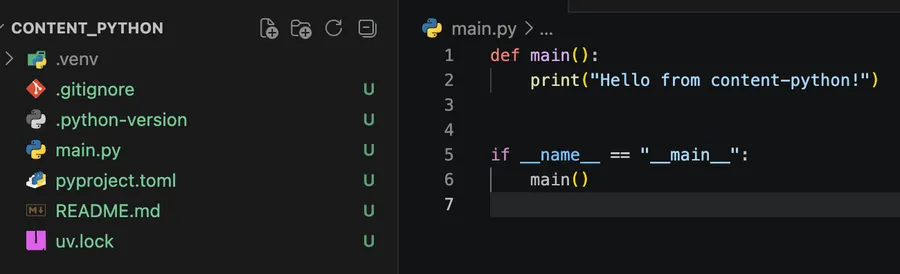
It can't get any easier than this. You ran 2 commands and you have a full Python project to start working.
What uv set up for us
Some may say that if you have Python installed on your computer and a simple file.py then you're good to go, and that's technically true.
So why the "extra stuff" that uv gives? That will help us have already a strong base to do our work.
pyproject.toml
uv builds this file and, to a large extent, manages it for you. It serves as a way to describe your project as a whole in a structured way. So you can have
name: what is your projectdescription: what it doesversion: in case you want to have multiple versions of itrequires-python: in case you want to define a specific version, since different Python versions have different features
But the most interesting is the dependencies part.
A dependency is a piece of code written by someone else that you can import to your project. This is because we can't simply develop everything ourselves so there are companies and open source projects that develop tools that we can take advantage of.
If the previous sentence hasn't set off some alarm bells, please notice the "written by someone else" part. You should do some research online before starting to add dependencies to your project. Quick Google searches can tell you if the project is old, based on a large community and stable. If the project is super small be careful. Adding something to your project that does something for you could lead to some nasty side effects, so be super careful.
.venv
You should never need to look at this folder, but this basically is a separate environment that you can use, discard and rebuild again. Think of it as your own safe space. So you have "automate script A" with a .venv and an "automate script B" folder with another .venv and you can have
- different Python versions
- different dependencies
As I mentioned before dependencies are quite useful but also dangerous, so be careful. But having uv managing the dependencies for you is quite nice because, if you start having a lot, it will get tricky quite quickly.
Another thing that is useful is that, in the same computer, you can test and run multiple versions of dependencies and even Python. So if you want to test a package you can create a quick new project, run the uv init and add the dependency you need, test it and if it works then you're good, otherwise you can trash the folder and that's it.
Before this we would install Python on our computers and corresponding dependencies and then, if we have 2 projects with different dependencies and requirements then we would have a problem. I know that other dependency packages exist and that this is an old, solved problem, but just to demonstrate why this is so useful.
Other files
There are other files for different purposes but I want to keep things simple.
The main idea is that with one command uv generated a nicely structured project that we can build on and that scales over time.
With this file structure, you can then save your work in a repository for safekeeping, for example.
Again, I want to keep things simple so I won't go into much detail, but in case you want some help please let me know.
Final Thoughts
I mentioned this before, but it's worth repeating. uv was not the first to do this. There were other tools that were quite good at trying to solve this problem, but uv made it simple. It removed some of the complexities, so that a person wanting to do a quick automation or a Python developer dealing with a lot of dependencies / environments / projects would be able to do it quickly and focus on the code.
There's a lot more that uv can do and let's see what OpenAI will bring to the table, but if you're trying to do some simple and fast scripts to solve a problem this is the way to go.
Sources
- Astral's site
uvdocumentation for more details
Photo by Pierre Châtel-Innocenti on Unsplash


No comments yet
Be the first to share your thoughts on this article!