
A whole month has passed quite quickly. If you missed the first issue of the newsletter, don't worry, you can check it here. If you like RSS, you can also subscribe to the newsletter via feed here in case you're like me and already get too many emails.
Also feel free to forward this newsletter to anyone who you feel would benefit from it. And if you got this from someone else, you can subscribe to get your own here.
Let's take a look at the main topics for this month, starting with Project and Publisher.
Project Online (September 2026) and Microsoft Publisher (October 2026) are "retiring"
I was a project manager for a lot of years, so everything related to Gantt charts has a soft spot in my heart. So it's sad to see Project Online going away, even if I never used it properly.
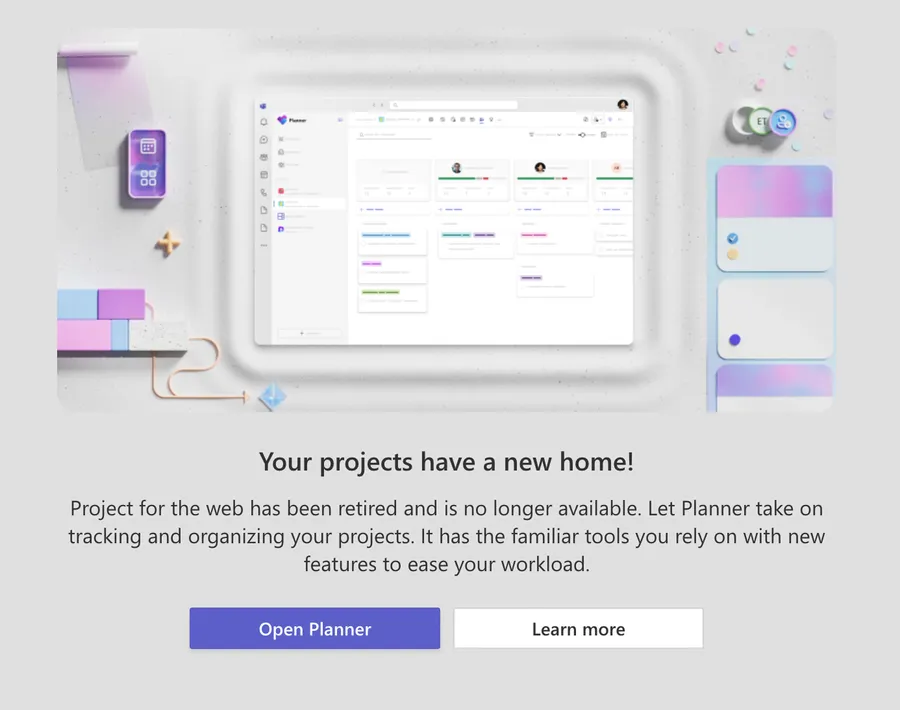
Microsoft Planner works just fine and it was included in your subscription, so having to pay something else would never make sense to me, and apparently to most people since Microsoft is canceling it.
Project Online retires on 30 September 2026. After that date you can no longer reach your projects or any of their data, so back everything up before then. There is no migration tool, which is a bad move, even if not a lot of people used it.
Microsoft's guidance is to export your data and rebuild in Microsoft Planner, or move to Project Server Subscription Edition, which Microsoft calls the closest match to Project Online's feature set.
As for Microsoft Publisher, it will go away too. Support ends on 13 October 2026 for the perpetual version, and the app disappears from Microsoft 365 on 1 October 2026.
If you have a Microsoft 365 subscription, you lose both the install and the download. If you bought the perpetual version, you can keep installing and using it after the date, you just lose support, so keep that installation file in a safe place in case you need to install it in the future.
If you're using it, here are the official migration steps that you should take before it goes away.
You can now use GitHub Copilot CLI or Claude Code with the Power Platform
An interesting one is using Power Automate with GitHub Copilot CLI or Claude Code. I haven't spent any substantial time with this, but as soon as I do, I'll write about it.
You can get the skills here and play and see what you'll get. It's an official Microsoft repository, and it works as a plugin marketplace, so the installer registers the marketplace and pulls the plugins for you.
As always I advise you to be super careful with the plugins you install, even official ones. Do a quick Google search to see if there's anything suspicious with it. Even official plugins sometimes get hacked, so it's good to be careful.
Super interesting work, but as with everything AI-related, validate and don't run it in production without doing some tests first.
Check your Power Pages / Dataverse permissions
Field Effect researchers found that some Power Pages were not configured correctly and exposed Dataverse tables to everyone. This was not an issue with Dataverse itself, but something to consider and check if you're using Dataverse.
The specific mistake was granting the Anonymous Users web role read access on table permissions, which then leaves those records readable through the public API and OData endpoints without any sign-in. It's "anonymous" after all, so everyone could access the data.
I recommend that you audit every internet-facing Power Pages site for Anonymous Users table permissions, and watch Dataverse audit logs for bulk read patterns. This is how people who find the unprotected data will try to get it.
Microsoft is moving in the same direction with native Dataverse authorization, in public preview since July 2026, which merges web roles into Dataverse security roles so there is one model instead of two.
It does not save you today, though, so do the audit.
Release "Wave 2" is coming
The next wave of releases, called "wave 2", planned for the end of September and October 2026, will ship a lot of things to a lot of countries, so be careful.
- 25 to 28 September 2026: Canada, France, Germany, India, Italy, Korea, Norway, Poland, South Africa, South America, Switzerland and the UAE.
- 2 to 5 October 2026: UK, Japan, Singapore, Sweden and Asia Pacific.
- 9 to 12 October 2026: Europe.
- 16 to 19 October 2026: North America and Australia.
For more details here's the calendar.
Worth flagging separately, because it already shipped rather than being part of this wave: share Process license capacity across workflows went generally available on 30 July 2026 as part of wave 1. Flow groups let you share one Process license across up to 25 cloud flows, so you can save some money by needing fewer licenses. These are great since the licenses are not cheap. Your flows have to live in a solution, and you need Process licenses available in the environment.
Also good to know that legacy whiteboards are permanently deleted on 5 September 2026 (the migration window closed on 22 August 2026), and AI Builder credits end on 1 November 2026 with no conversion to Copilot Credits. That date removes the seeded credits that come with premium licenses. If you bought AI Builder capacity add-ons, those credits stay usable until your contract expires.
From September 2026, Microsoft stops publishing release plans. New Power Platform and Dataverse capabilities move to the AI at Work roadmap instead, so the pages you have bookmarked will stop filling up.
I will send you what you need to know in the newsletter, as well as some stuff not reported there, like security issues.
Now let's take a look at some technical stuff.
If you're a security manager in your company (technical details)
This part is a bit technical, but important to be aware of.
Forward this to your security manager or someone responsible for managing the Power Platform. They should be aware of this by now, but it's worth checking.
Here are some quick things to know:
- Two security holes were found and fixed, but check if anyone used them. Every security hole gets a number, called a CVE, and a score from 0 to 10 for how bad it is. CVE-2026-20960 in Power Apps, published 16 January 2026, scored 8.0 and let someone who already had a login run code they shouldn't. CVE-2026-23652 in Power Pages, published 21 May 2026, scored the maximum 10.0 and let anyone on the internet do the same, no login needed. Microsoft fixed both on their side, so there's nothing for you to install. What we should do is look at the logs around those dates for anything strange, and if you have custom code on a public Power Pages site, make sure it checks what people type in before using it. The full details are in the National Vulnerability Database (20960, 23652).
- Copilot Studio can now use AI models from other companies. Claude Sonnet 5 and GPT-5.5 Chat are ready for real use, and Mistral Medium 3.5 is there to try but marked as experimental. Two things to know about Claude Sonnet 5. It only works in agents built with the GitHub Copilot harness (the newer way of building agents in Copilot Studio), and in the United States it's only available in early release environments. Also, experimental models may send your data outside your region. Microsoft's own words are that the data "might be processed and stored outside of your organization's geographical boundaries" (Select the model for your agent). If your company promised customers that their data stays in the EU, check the model's status and the region table on that page before you publish the agent.
- Agents can now remember things about each user, and each agent decides for itself. The person building the agent turns Memory on or off, one agent at a time, so there's no single switch for the whole company. What an agent remembers about you is private to you, the builder can't see it, and it's deleted after 28 days without talking to the agent. Two things to decide as a company. The memories are stored "in a dedicated folder in Microsoft-managed storage", not in Dataverse where your usual controls live. And turning Memory off doesn't delete what was already saved, it only stops the agent from using it.
- Purview audit logs got less detailed in May 2026. Dataverse keeps a record of every change, called an audit log, and it used to send both the old and the new value of each changed field to Microsoft Purview, Microsoft's compliance tool. Since May it only says that something changed, not what (important changes). If you have alerts in Purview watching for suspicious edits, they now work with less information, and probably nobody told you. The full detail is still inside Dataverse, so point those alerts at the Dataverse audit data instead.
- Every new Copilot Studio agent now gets its own identity, and you can't opt out. Think of it as the agent getting its own account in your company directory, Microsoft Entra. Microsoft's wording is "all new agents have Microsoft Entra Agent IDs, and you can no longer opt out of automatic agent identity creation" (Automatically create Entra Agent IDs). This is good news, because admins can see which connectors an agent is allowed to use, the same way they see permissions for people. The flip side is that every agent is one more identity to keep track of. Agents created before May 2026 keep working the old way until Microsoft migrates them in a future update, or you do it yourself in the admin center, so you'll have both kinds for a while.
- You can now export full agent conversations to Application Insights, so be careful who can read them. Application Insights is Azure's monitoring tool. This option is in preview, only for managed environments, and you turn it on per environment in the Power Platform admin center (docs). It sends everything: what the user typed, what the agent replied, which tools it called and what they returned, plus the user's name and email address. Those are real conversations, not statistics, going to a place with different permissions than Dataverse. Before turning it on, check who has access to that Application Insights workspace.
- SharePoint's "hide this from Copilot" settings now work in search too. There are two of them. Restricted Access Control locks a site to a specific group. Copilot and company-wide search now honor it as well, so even someone with direct permissions to a file won't see it if they're not in the group (docs). Restricted Content Discovery is the softer one. Permissions stay as they are, but the site's content stops showing up in company-wide search and Copilot answers, and the site loses its AI buttons, like the Copilot button, AI actions, and Create pages with AI (docs). If you have sensitive sites that stayed safe only because nobody found them, they're now better protected. Expect fewer search results, in the safe direction.
It's not as scary as it looks, but super important to keep in mind.
Some updates to the site
Since you're a newsletter subscriber, you will know things before they happen :).
Soon I'll release the account system on the site with a few new features and things that I think will be useful for you. I will publish something on the site, so be sure to take a look at the announcements for anything new, but the gist is that I'll have a few niceties to start and then improve and add stuff over time.
The idea is to have a strong structure first and then start putting stuff on the site that was not possible without the account system in place.
As always, things won't change, they will improve. AI crawlers are getting out of hand, so it will be a nice balance of usability versus not allowing the bots to get everything that they want from the website.
Random Stuff
- LinkedIn's new anti-slop button is coming to every platform. If you've used LinkedIn for more than 10 minutes, you've noticed that its influencers are out of control. Their "solve every problem with these 3 prompts" articles clearly show someone who doesn't exist trying to sell you something that doesn't exist as well. Now we have, at least, a way to complain, not that this will solve the problem.
- Speaking of LinkedIn, if you want to be "that kind of influencer" here's a nice tool to generate the posts for you. Amazing!
- Agents are super good at booking gym classes, a scary story of an agent that hacked a gym booking system to bump its owner up the waitlist.
See you all in one month.
Photo by Moritz Kindler on Unsplash


No comments yet
Be the first to share your thoughts on this article!