As a freelancer I get some requests for quotes and that's great. That's how the business stays alive. But I've seen more and more these turning into some opportunities for phishing attacks.
I'll show you an email that I got, and use it to walk through how to spot the patterns and how you can tell that someone is not who they say they are.
Here are some quick things to check when you receive an email from someone you don't know.
What to check first?
Here's the email that I received. I won't blur anything since it's all fake.
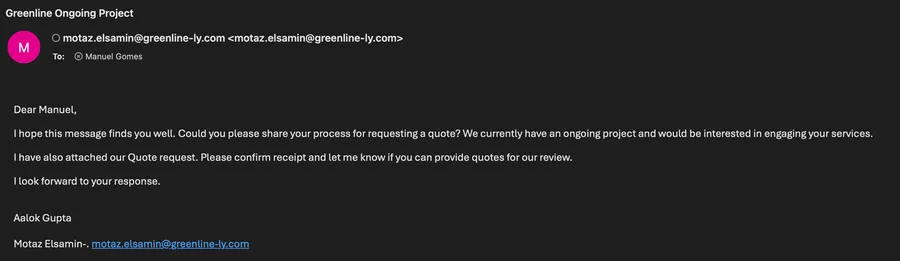
So when I receive this email the first thing I do is look at the domain and see if it exists. There are a lot of ways to do this, but I never copy and paste it and access it directly because I don't know what the website could contain.
A nice Google search is always preferred and you can keep it as simple as possible
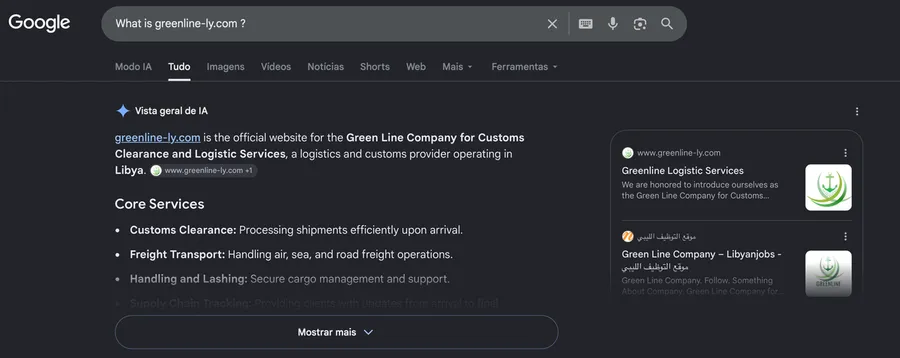
Now with AI, Google will tell you a lot that you need to know.
Being a company based in Libya doesn't make it a red flag. There are a lot of legitimate companies there, so, so far so good.
Looking now at the actual email here's the first red flag.
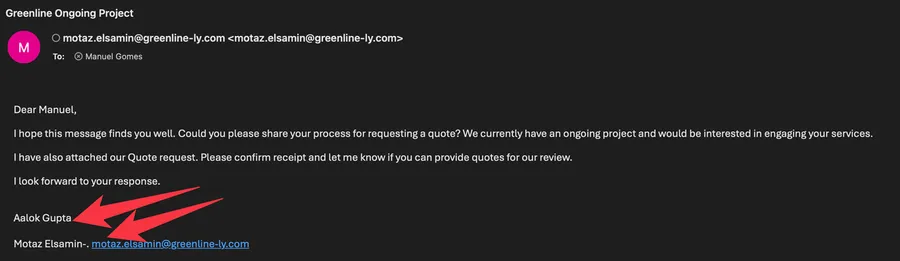
No company in the world would make this basic mistake of sending an email from one account and then signing as another person, without being obvious why.
Check for telltale signs that the email could be fake. Check the domain it comes from and if there are things "that don't make sense" like signatures and strange text
So this already raises some alerts.
Another thing that triggered some alerts but could be a mistake is
I have also attached our Quote request.
Apart from the text being "strange", there's no attachment. We all know that we should not open attachments from unknown sources, so I could even give the benefit of the doubt here because the person may have forgotten.
Let's check the real issue.
The real problem comes when you click reply
Here's what I saw when I clicked reply.
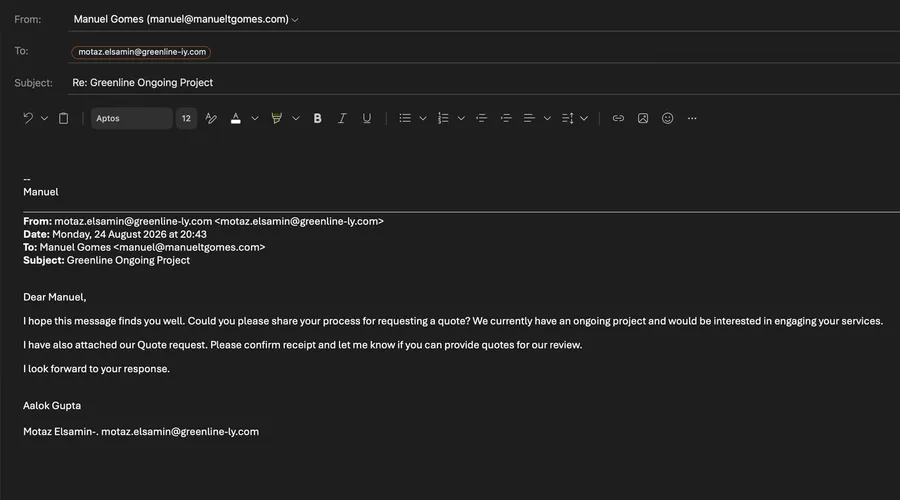
Notice something? I didn't notice it as well right away, so let me point it out.
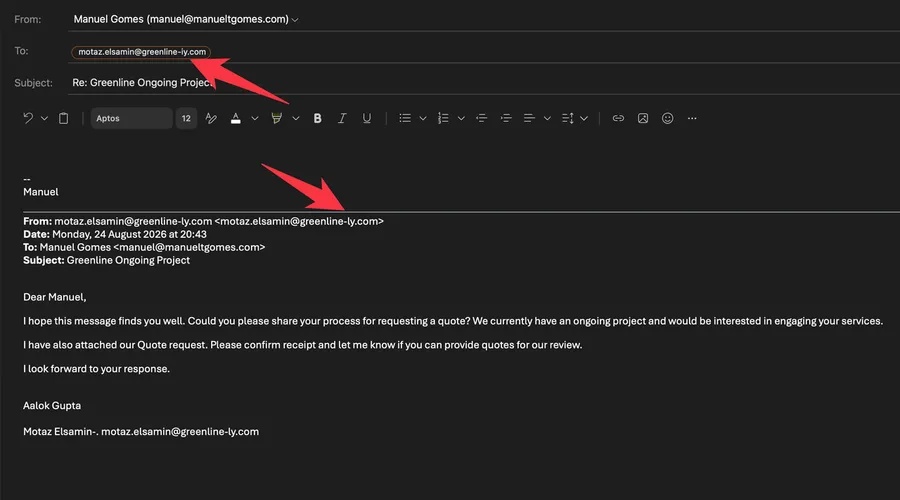
The reply-to address changed from greenline-ly.com to greenline-iy.com.
It was made to look the same at a glance, since when we click "reply" we're already thinking about what to write and don't pay attention to the address.
Why do they do this?
There's an expectation that when we're clicking reply we are replying to the email that we see, but that's not always the case.
This is based on a feature as old as email itself called the "Reply-To" header. It allows an email to be sent and for the reply to go to somewhere else.
There are a lot of useful and legal uses for this:
- When people change emails, they may send the email from a familiar source but want people to start sending emails to another email address
- Email systems that only send emails will often offer another email to reply to that is monitored. This is quite common in sales where companies use the "no-reply" but then if you want more information the reply could go to "sales" for example.
- Shared team mailboxes where you can send an email from a person but then another team receives the email. It's similar to the one above with the difference that the first mailbox can also receive replies.
Spammers are smart. They keep the real sender address visible and quietly route your reply to a second, fake address. Then the phishing can proceed because you have your lowered defenses and think you're addressing a legitimate company.
To avoid being tricked, always check the "reply" field even if the source email is legitimate and you already checked it.
This is a common vector of fraud. You get a seemingly legitimate email from a legitimate company and then reply without seeing that the sender is fake.
What to do?
Here's a quick checklist:
- Is the source domain legitimate?
- Do I see something in the email that "doesn't make sense"?
- When I click reply does the domain change?
As always don't open attachments even if they look legitimate. They could contain a lot of nasty things that can damage your computer or worse yet, steal your information.
Another important thing is to mark the email as spam and delete it, and above all don't reply to the email or change the email to the original one. The person that has the real email will not know for sure because they are being impersonated, so no use in sending an email to them.
Remember that spammers are looking to trick you and since all of us are busy and receive a lot of emails, these things fall through the cracks, but it's best to stay vigilant.
Final Thoughts
I've left the technical details out because they don't really matter in this case. I just wanted to show you how these things are dangerous and how easily people can trick us into lowering our defenses.
Keep safe out there. Close to half of all email is spam or fraud, so keep that in mind every time something lands in your inbox.
Photo by Joshua Hoehne on Unsplash
No comments yet
Be the first to share your thoughts on this article!