Validating data before using it is one of the most useful habits we can pick up in Power Automate, and the "isInt" function exists for exactly that reason. It looks at a string and tells us whether that string represents an integer, returning a simple boolean we can plug straight into a condition. No conversion, no side effects, just a yes or no answer.
It belongs to the logical comparison family, alongside equals, greater, and empty. The job is simple, but the edge cases deserve attention, especially when we are about to feed the value into the int function or into a SharePoint number column.
Where to find it?
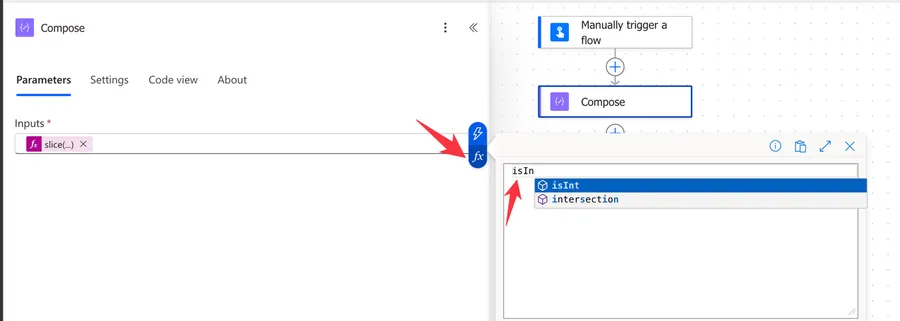
The "isInt" function appears in any Power Automate action that accepts expressions, such as the Compose action, the Condition action, or the value field of an Initialize Variable action. Open the Expression tab (the "fx" icon) and either type isInt( or scroll down to the Logical functions section in the picker.
The int function converts a string into an integer and throws an error when the value is not numeric. The "isInt" function only checks the string and never converts. Reach for "isInt" first, then for "int" once we know the value is safe.
Usage
The function takes a single string parameter.
isInt('<string>')
| Parameter | Required | Type | Description |
|---|---|---|---|
| string | Yes | String | The string we want to check |
The return is always a boolean, either true or false.
Basic example
isInt('10')
Returns true.
isInt('Lisbon')
Returns false.
Inside a condition
We can drop the expression directly into a Condition action, comparing the result with true. A more common pattern, however, is to combine it with the if function so that the whole guard fits in one expression.
if(isInt(variables('UserInput')), int(variables('UserInput')), 0)
Breaking this down:
variables('UserInput')reads the value the user enteredisInt(...)returnstrueonly when that value is a clean integer string- When the check passes,
int(...)converts the string to a real integer - When the check fails, the expression falls back to
0
Comparison with isFloat
The sibling isFloat function checks whether a string is a floating point number and accepts an optional locale code. The "isInt" function has no locale parameter, so the rules are stricter and the same for every region.
Real-world examples
Validating user input from a Microsoft Forms response
Imagine a registration form built in Microsoft Forms where Joana types her age into a free text field. Before we write that value into a SharePoint list, we want to be sure the field is a whole number.
if(
  isInt(triggerOutputs()?['body/responses/age']),
  int(triggerOutputs()?['body/responses/age']),
  null
)
If Joana types 34, the expression returns the integer 34. If she types 34 years or leaves the field empty, the expression returns null and the SharePoint column stays empty instead of failing the run.
Filtering an array of mixed values
Suppose the response from an external API mixes IDs and labels in the same array, and we only want the numeric IDs. Inside a Filter Array action, set the value to:
isInt(item())
And the condition to is equal to true. Only the elements that pass the check make it into the filtered output.
Guarding a calculation
When summing values that may come from a column where users sometimes type words instead of numbers, the add function will fail at the first bad row. Wrap each operand with a guard.
add(
  if(isInt(variables('Score1')), int(variables('Score1')), 0),
  if(isInt(variables('Score2')), int(variables('Score2')), 0)
)
The flow keeps running and the bad rows simply contribute zero to the total.
Edge Cases
The function is simple, but a few cases catch people off guard. Let's walk through them.
Decimals are rejected, even when the decimal is zero
isInt('10.0')
Returns false. This one trips many people, since 10.0 is "technically" an integer. The function does not look at the numeric value, it looks at the string, so anything that contains a dot is rejected. If our source data appends .0, we need to clean the string first with split or the replace function.
Negative integers are accepted, scientific notation is not
isInt('-42')
Returns true. A leading minus sign is allowed, and a leading plus sign like '+42' is also accepted by the parser. Scientific notation such as '1e3' is not, even though it represents an integer mathematically.
Thousands separators always fail
isInt('100,000')
Returns false. The comma is not a digit, so the string fails the check. The same goes for spaces ('100 000'), apostrophes, and any other formatting character. If our source data uses separators, we need to strip them with replace before testing.
Whitespace breaks the check
isInt(' 10')
Returns false. The space is not a digit. Run the value through the trim function before the check to avoid losing valid integers because of stray whitespace coming from CSV imports or copy-pasted text.
Empty strings are fine, null is not
isInt('')
Returns false cleanly. However, null is not handled gracefully.
isInt(null)
Returns:
Flow run failed. Action 'Compose' failed: Unable to process template language expressions in action 'Compose' inputs at line '0' and column '0': 'The template language function 'isInt' expects its first parameter 'string' to be a string. The provided value is of type 'Null'. Please see https://aka.ms/logicexpressions#isInt for usage details.'.
Raises an InvalidTemplate error because the function expects a string parameter and null is not a string. When the value can be missing, wrap it with coalesce.
isInt(coalesce(variables('MaybeNull'), ''))
That way a missing value cleanly resolves to false instead of failing the run.
Very large numbers pass the check but break afterwards
The function returns true for any string of digits, regardless of length. That can give a false sense of safety, because the int function that we usually call next has a hard limit of 2,147,483,647, the upper bound of a 32-bit signed integer. A 12 digit phone number such as '351912345678' will sail past "isInt" and then fail at the conversion step.
I see the 32-bit signed integer information online but I can't find an official Microsoft document indicating that this is indeed the case. If you have it please reach out and I'll edit the article, but I'm including it here for the sake of completeness.
If our input can grow that large, follow the check with a length comparison before converting.
Limitations
No locale awareness
Unlike "isFloat", the function does not accept a locale code. An accounting export, for example, that uses thin spaces as a thousands separator and a comma as the decimal mark will be rejected even when the underlying number is a perfectly valid integer. We have to normalize the string ourselves.
Strings only
The parameter must be a string. Passing the result of an expression that already returns an integer (isInt(length('Lisbon'))) raises an error. Wrap the value with the string function when the source is not already textual.
isInt(string(length(variables('CityName'))))
Expression size
Depending on the size of the input and nested functions, the expression may return an error even when it is correct. Expressions have a max size of 8,192 characters. If we have an expression bigger than 1,000 characters, it is worth breaking it into smaller, manageable formulas.
Troubleshooting Common Errors
Symptom: InvalidTemplate. Unable to process template language expressions ... 'isInt' expects its parameter to be a string.
Cause: We passed an integer, a boolean, or a null value to the function.
Solution: Wrap the input with the string function, or with coalesce when null is possible.
isInt(coalesce(string(variables('Value')), ''))
Symptom: The check returns true, but the next int conversion fails with The integer value is too large.
Cause: The string is all digits but exceeds the 32-bit signed integer maximum (2,147,483,647).
Solution: Add a length guard before converting, or switch to the float function for numbers that legitimately exceed that range.
Symptom: The check returns false even though the value looks like a number.
Cause: The string contains hidden whitespace, a thousands separator, or a decimal point.
Solution: Trim the value, replace separators, and only then run the check. A quick Compose action with the raw value usually reveals the offender.
Recommendations
Here are some things to keep in mind.
Normalize before checking
Trim whitespace, strip thousands separators, and call the string function on the input. The function rewards clean strings and punishes formatted ones, so do the cleanup once at the top of the flow and reuse the cleaned value.
Use it as a gate, not as the only validation
The function only tells us that a string looks like an integer. It does not tell us that the integer is within an expected range, or that the value belongs to the user, or that it is one of a known set. Combine it with a Condition action or a Switch action for the business rules.
Add a comment
When the expression grows beyond a single function call, leave a comment explaining what the guard is protecting against. It will save us time the next time we open the flow, and it helps anyone else who has to maintain it.
Final Thoughts
The "isInt" function is small, predictable, and easy to underestimate. Used on its own, it answers a single question. Used together with trim, replace, coalesce, and a thoughtful fallback, it becomes the first line of defense against the messy data that real users send into our flows.
Sources
Back to the Power Automate Function Reference
Photo by Lucas van Oort on Unsplash



No comments yet
Be the first to share your thoughts on this article!