
When you add an optional input to a "Manually trigger a flow" trigger, you would expect an empty field to simply give you an empty value. That is not what happens. If the person running the Flow leaves that optional input blank, Power Automate throws an error the moment you try to read it, and the whole run fails.
I promised to cover this in the trigger's reference article (a while ago, sorry about that), so here it is. In this walkthrough we will look at why the error happens and how a single character fixes it, and then we will go a little further and give the value a proper fallback so your Flow keeps running no matter what the user types.
Why an empty optional input throws an error
The confusing part is that an optional input behaves differently from a mandatory one. With a mandatory input there is always a value, so triggerBody() always has the property you are looking for. With an optional input, Power Automate does not create the property at all when the field is left blank. It is not empty, it simply is not there.
So when you pick the field from the "Dynamic Content" list, Power Automate writes this for you:
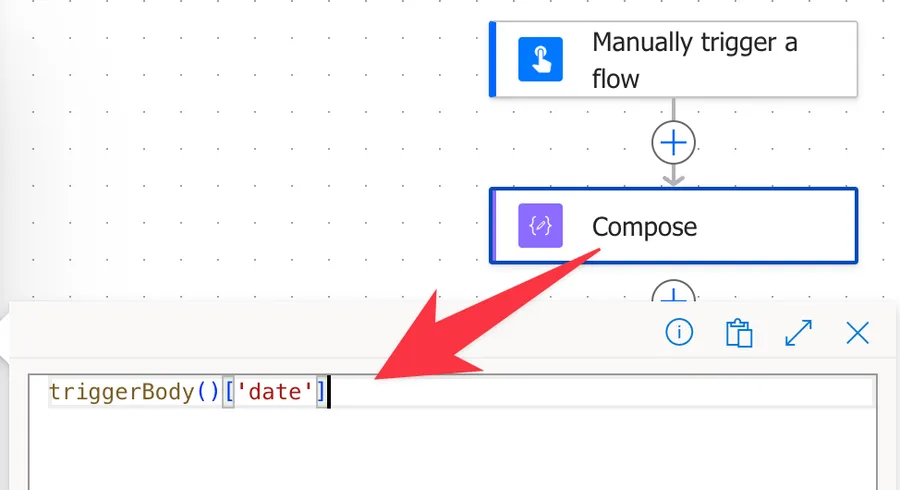
triggerBody()['date']
That expression tells Flow "there is a value here, go get it." If the user filled the field in, everything works.
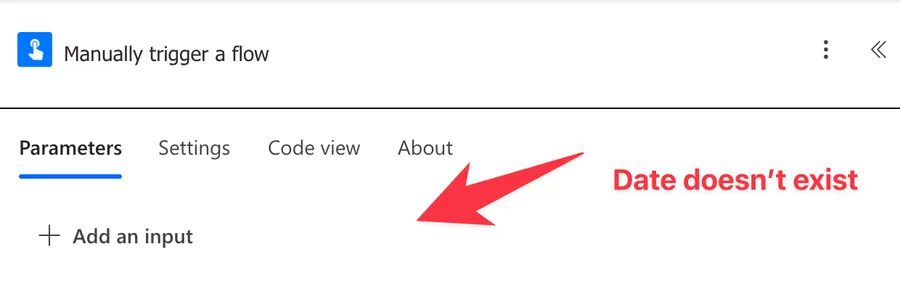
Here's the trigger:
Using a simple "Compose" action we can simulate the issue:
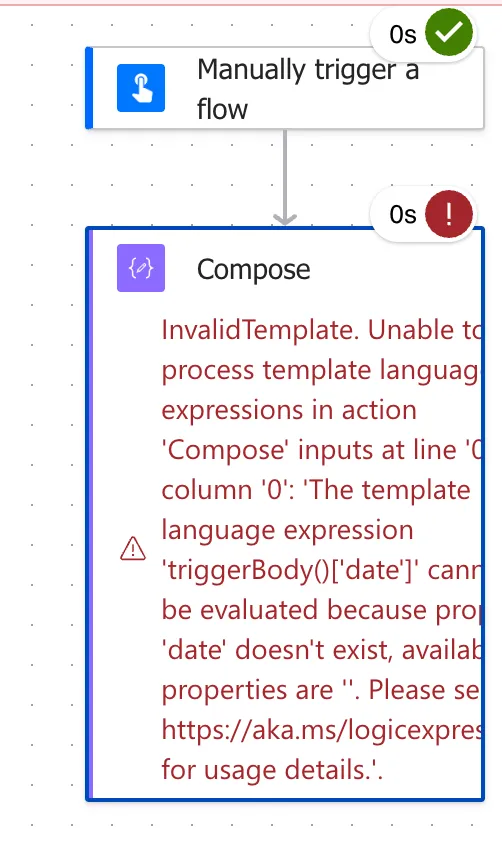
If they did not, the property date does not exist and Flow gives up with an error like this one:
Flow run failed. Action 'Compose' failed: Unable to process template language expressions in action 'Compose' inputs at line '0' and column '0': 'The template language expression 'triggerBody()['date']' cannot be evaluated because property 'date' doesn't exist, available properties are ''. Please see https://aka.ms/logicexpressions for usage details.'.
The fix: tell Power Automate the field is optional
The fix is a single question mark. Instead of demanding the value, you ask for it safely:
triggerBody()?['date']
Here is the difference broken down:
triggerBody(): gets the object with all the values the trigger received?['date']: the?before the brackets makes this a safe lookup, so ifdateis missing you get a null value instead of an error
That question mark is the whole trick.
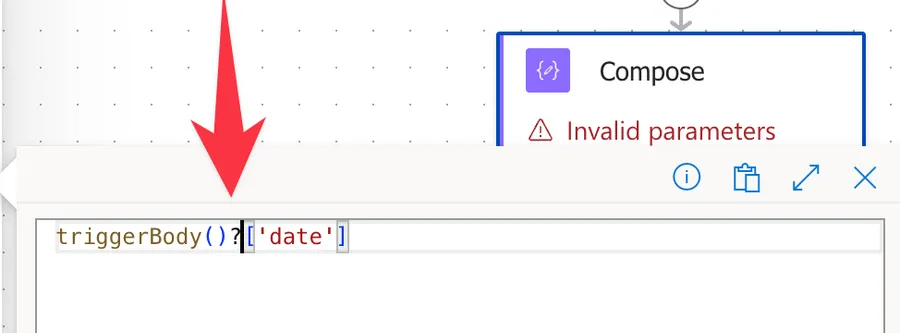
It changes the meaning from "this value must exist" to "try to find this value, and it is fine if it is not there." With the safe version in place, an empty optional field returns null and your Flow keeps running.
You have to type the expression yourself
There is one catch that trips people up. You cannot get the safe version by picking the field from the "Dynamic Content" list, because that list always inserts the plain triggerBody()['date'] form without the question mark.
You have to write the expression by hand in the expression editor. The good news is that you already know the exact property name, because the error message told you (date in the example above). So you only need to copy that name into the safe pattern and add the question mark:
triggerBody()?['<yourFieldName>']
Swap <yourFieldName> for the internal property name from your own error message, and you are done.
Give the value a fallback with "coalesce"
Reading the value safely stops the error, but null is rarely what you actually want downstream. Most of the time you want a sensible default when the user leaves the field blank. The "coalesce" function is perfect for this, because it returns the first value that is not null:
coalesce(triggerBody()?['date'], 'No date provided')
triggerBody()?['date']: safely reads the optional input, returning null if it was left emptycoalesce(..., 'No date provided'): returns the first non-null value, so you get the user's date when it exists and the fallback text when it does not
Drop that into a "Compose" action and you will always get a clean, predictable value to work with.
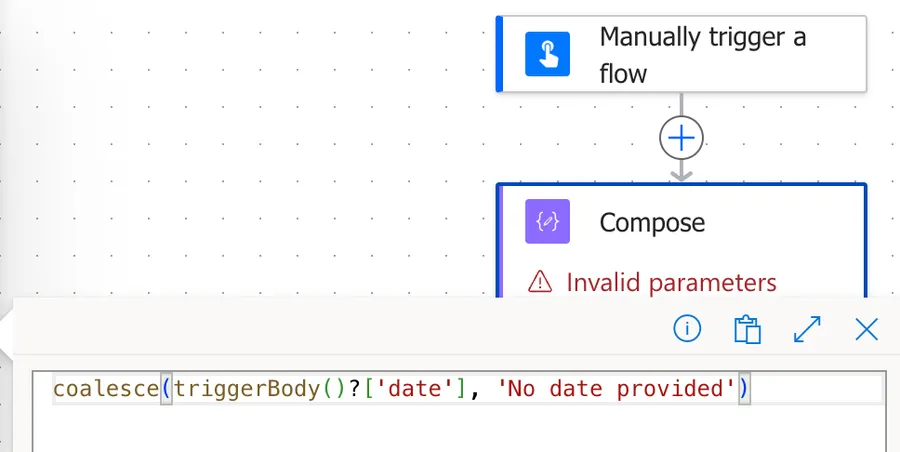
Here's the result:
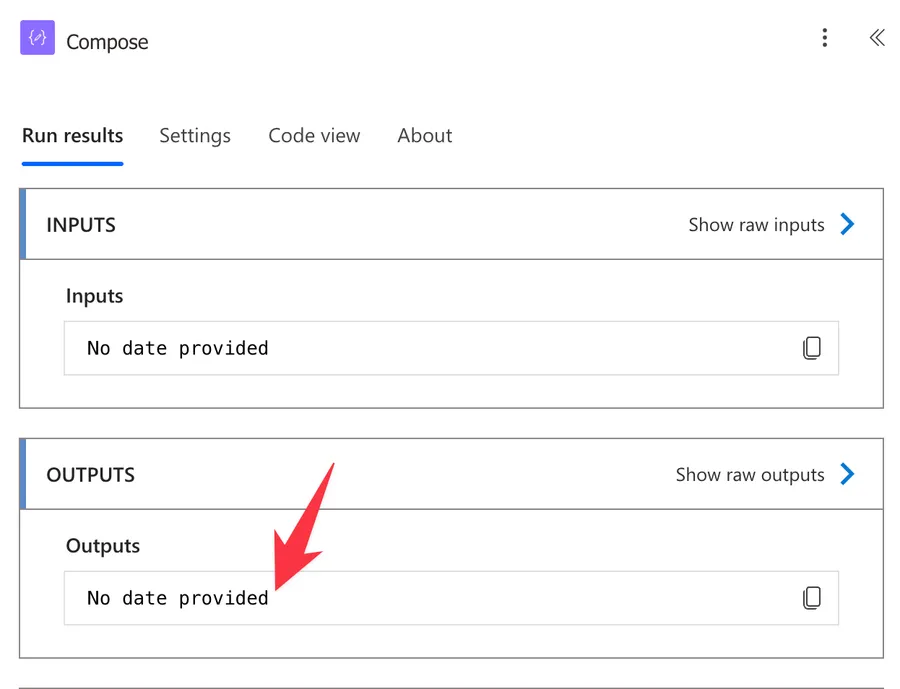
The value doesn't need to be "No date provided". It's whatever makes sense to you when you're processing the Flow.
React to whether the value was provided
Sometimes you do not want a default, you want your Flow to branch depending on whether the user supplied the value. Pair the "empty" function with the "if" function:
if(empty(triggerBody()?['date']), 'Not provided', triggerBody()?['date'])
empty(triggerBody()?['date']): returns true when the safe lookup is null or blankif(..., 'Not provided', ...): returns "Not provided" when it is empty, otherwise returns the actual value
The same idea works inside a "Condition" action if you would rather take a completely different path when the field is missing.
Common mistakes
Using the value straight from the Dynamic Content picker
The picker always inserts the unsafe triggerBody()['date'] form. If any of your inputs are optional, go into the expression editor and add the question mark yourself, otherwise the Flow works in testing (when you fill everything in) and fails in production (when someone does not).
Adding the question mark in the wrong place
The ? goes right before the brackets you want to make safe: triggerBody()?['date']. Writing triggerBody()['date']? or leaving it off entirely does nothing to protect you from the missing property.
Forgetting that null is still not a real value
Safe navigation stops the error, but it hands you a null. If a later action cannot handle null, wrap the value in "coalesce" or check it with "empty" before you use it.
Final Thoughts
Optional inputs in a manual trigger are one of those small quirks that cause a lot of head-scratching until you understand what is really happening. The property is simply missing when the field is blank, and the single question mark in triggerBody()?['date'] is all it takes to handle that gracefully. Add a "coalesce" fallback on top and your Flow will behave predictably whether the user fills the field in or not. If you want the full picture on the trigger itself, head back to the "Manually trigger a flow" reference article.


No comments yet
Be the first to share your thoughts on this article!