
Comparisons are extremely useful in any programming language or platform, and Power Automate is no exception. The "equals" function takes two values and tells us whether they are "equivalent". Notice that we're not checking if they are literally the same object, but this will make sense below.
So let's check it in more detail.
Where to find it?
The "equals" function lives in the expression editor, so you won't find it as a standalone action in the picker. Instead, you reach for it inside actions that evaluate an expression. The most common homes for it are the "Compose" action, the "Condition" action, the "Filter array" action, and any time you set a variable.
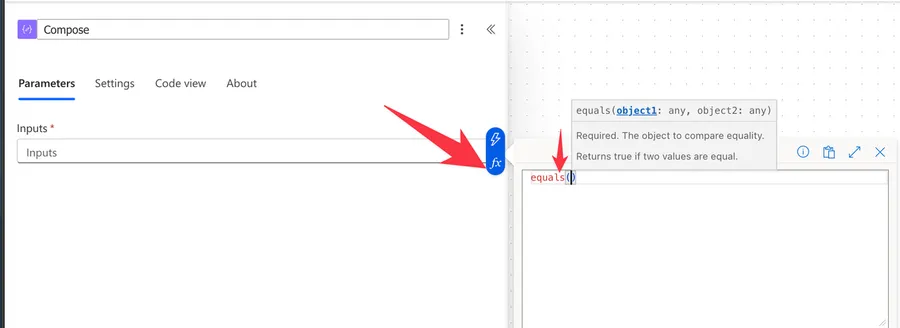
Let's see how it works.
Usage
It follows a simple pattern, taking the two values you want to compare.
equals(<object1>, <object2>)
| Parameter | Required | Type | Description |
|---|---|---|---|
| object1 | Yes | Any | The first value or object to compare |
| object2 | Yes | Any | The second value or object to compare |
Let's start with a simple example:
equals(10,10)

will return

true
It works also with float numbers:
equals(12.2,12.2)

will return

true
Now let's look at strings. The comparison is case-sensitive and requires that all characters are the same. For example:
equals('a','a')

returns

true
But this:
equals('a','A')

returns

false
Let's compare boolean values now, but one of them is a string:
equals('true',true)

returns

false
They are different datatypes and we can't convert a random string (even if the characters are the same) into a boolean. But how about ints?
equals(1,true)

returns

true
Let's look at an array:
equals(createArray(1,2,3),createArray(4,5))

will return

false
They are different so it makes sense. How about if the arrays are the same?
equals(createArray(1,2,3),createArray(1,2,3))

will return

true
So we can use the equals function to compare arrays.
Real-world examples
Here are a couple of everyday scenarios where the "equals" function earns its keep.
Routing an approval by department
Imagine João submits a request and you want to send finance requests down a different path. Inside a "Condition" action, you can compare the department field:
equals(triggerBody()?['Department'], 'Finance')
If the value matches, the flow follows the "true" branch and notifies the finance team.
Filtering a list of items
Let's say Maria has a list of tasks and you only want the completed ones. Inside a "Filter array" action, the "equals" function keeps only the rows that match:
equals(item()?['Status'], 'Completed')
Everything that doesn't match is quietly dropped, leaving you with a clean list to work with.
Non-intuitive behaviors
The "equals" function looks simple, but a few of its behaviors surprise people at runtime.
Comparing with null doesn't do what you expect
When you compare a value against null using the "equals" function, Power Automate quietly converts null to an empty string before comparing string fields. So an expression like equals(variables('myString'), null) can return false even when the field looks empty, because it's really comparing against ''.
For a reliable "is this blank?" check, use the "empty" function instead, and keep the "equals" function for comparing two real values. If you want to substitute a default when a value is missing, the "coalesce" function is a better fit.
The comparison is always case-sensitive
As we saw above, equals('a','A') returns false. This trips people up constantly when comparing text that users typed in. If you don't care about casing, normalize both sides first with the "toLower" or "toUpper" function:
equals(toLower('Yes'),'yes')

returns

true
Different data types can still match
The equals(1,true) example earlier returns true because the values are treated as equivalent. If you need a strict match where type matters, compare the values in the same datatype on both sides so a stray string or number doesn't slip through.
Limitations
Depending on the size of your string, your expression may return an error, even if it's correct. Please note that expressions have a max size of 8,192 characters. If you have an expression that is even bigger than 1000, I would strongly advise that you break it into smaller, manageable formulas.
Troubleshooting Common Errors
Symptom: Your condition always follows the "false" branch even though the two values look identical.
Cause: The comparison is case-sensitive, or there's hidden whitespace, or the datatypes don't match (the string 'true' is not the boolean true).
Solution: Normalize both sides before comparing.
equals(toLower(trim(variables('input'))),'yes')
Symptom: Comparing a field against null returns false for fields that look empty.
Cause: Power Automate converts null to an empty string inside logical functions.
Solution: Use the "empty" function for blank checks.
empty(variables('myString'))
Recommendations
Here are some things to keep in mind.
Use "debug" Compose actions
Since the comparison will return true or false, sometimes it's tricky to understand how the calculation is done, depending on how complex the expression is. So I recommend using the "Compose" action to inspect the values that go "in" the function. This way, if the result doesn't make sense, you can understand, based on the parameters, why it was calculated that way.
Don't nest
There's no real reason to do it. In fact, if you try to nest "equals" functions you'll receive an error unless it's a boolean either on the left or right side, but that would not be very helpful. If you have a scenario where it makes sense to nest "equals" functions, please let me know.
Be very careful to avoid breaking Flows.
Final Thoughts
The "equals" function is one of those small building blocks you'll reach for constantly, so it's worth knowing exactly how it treats data types, casing, and empty values. Keep an eye on those comparisons, lean on the "Compose" action when things get tricky, and you'll sidestep most of the surprises.
Sources
Back to the Power Automate Function Reference
Photo by Prateek Katyal on Unsplash



You believe equals('a','a') To be valid in PowerAutomate? Try it! "The function operator 'equals' is not supported or its usage is invalid. clientRequestId: serviceRequestId: " Anyone know how to >ACTUALLY< compare strings?