
The "getPastTime" function answers a question you ask more often than you'd think. "What was the timestamp a while ago?" You give it a number and a unit, and it hands back a timestamp that far into the past, counted from this exact moment. Everything that looks backward starts here. Items modified in the last 24 hours, tickets older than 30 days, the archive sweep that only touches files nobody has opened since last year.
It's a convenience wrapper. Underneath, it's the "utcNow" function plus a subtraction rolled into one call, which is exactly why people reach for it in Power Automate. Let's look at how it works, where it earns its keep, and the handful of places where it quietly does something you didn't ask for.
Where to find it?
You can use the function anywhere an expression is supported. In practice it turns up inside a "Compose" action, an "Initialize variable" action, a "Condition" action, or in the filter query of an action that fetches records, like the "SharePoint Get Items" action.
The two functions do the same math, but "getPastTime" always starts from right now, while "subtractFromTime" starts from a timestamp you hand it. If you're counting backward from a created date that came off a list item, "getPastTime" cannot help you. It has no idea that date exists.
Let's look at how to use it.
Usage
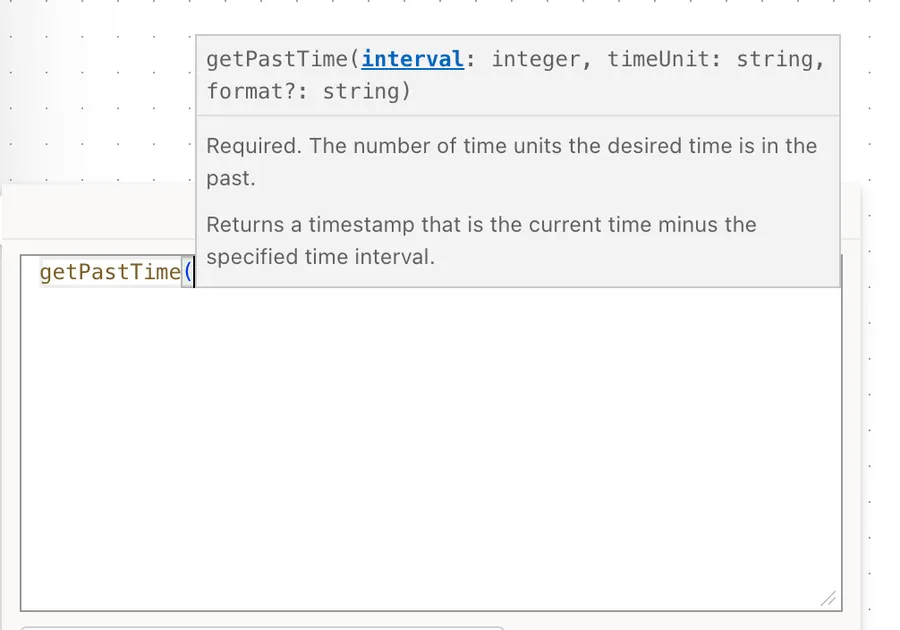
The "getPastTime" function takes two required parameters and one optional one:
getPastTime(<interval>, '<timeUnit>', '<format>'?)
| Parameter | Required | Type | Description |
|---|---|---|---|
| interval | Yes | Integer | How many time units to subtract from the current moment |
| timeUnit | Yes | String | The unit to subtract. One of Second, Minute, Hour, Day, Week, Month, or Year |
| format | No | String | A standard format specifier or a custom format pattern. Defaults to o (ISO 8601), which keeps full precision |
The function returns a string, and an invalid format string produces an error rather than a quiet fallback. Notice that the interval is a number and carries no quotes, while the unit is text and does. Mixing those two up is the single most common way to make this function fail.
The simplest possible example asks for the timestamp five days ago:
getPastTime(5, 'Day')
If the current moment is 2026-07-16T09:00:00.0000000Z, this returns 2026-07-11T09:00:00.0000000Z. The time of day comes along for the ride. You asked for five days ago, not for the start of the day five days ago.
Using a custom format
The third parameter shapes the output, and it's the one you want whenever the value is going in front of a person:
getPastTime(5, 'Day', 'D')
That returns Saturday, July 11, 2026. You can also build your own pattern when you need something specific:
getPastTime(1, 'Week', 'dd-MM-yyyy')
That returns 09-07-2026. The formatting rules are the same ones the "formatDateTime" function uses, so anything you already know from there applies here.
Using it in a filter query
This is where the function pays for itself. If you want every item touched in the last 7 days, one line does it, with no variables and no loops:
Modified ge '@{getPastTime(7, 'Day')}'
The "greater than or equals" operator does the comparison and the expression supplies the boundary. Bracket both ends when you want a window rather than an open tail:
Modified ge '@{getPastTime(7, 'Day')}' and Modified le '@{utcNow()}'
That second one uses the "and" operator to join the two halves.
Using a dynamic interval
The interval doesn't have to be hard-coded. If the number of days arrives from a trigger or a variable, feed it through the "int" function so it lands as a number rather than as text:
getPastTime(int(triggerBody()?['DaysBack']), 'Day')
Let's break that down:
triggerBody()?['DaysBack']reads the field from the trigger payload. The "triggerBody" function gets the payload, and the?['DaysBack']reaches safely inside it, returning null instead of failing if the field never arrived.int(...)converts that value into a proper integer, which is what the first parameter demands.'Day'is the unit, quoted because it's text.
Real-world examples
An archive sweep
Joana wants every document nobody has touched in a year moved out of the working library. You never need to compute a date by hand. The filter carries it:
Modified le '@{getPastTime(1, 'Year')}'
Anything older than that boundary comes back, and the boundary slides forward on its own with every run.
A stale ticket escalation
You have a scheduled Flow on a "Recurrence" trigger that chases support tickets left open too long. Manuel's team gives itself 48 hours, so the whole rule is one expression:
Created le '@{getPastTime(48, 'Hour')}' and Status ne 'Closed'
Because "getPastTime" is evaluated fresh on every run, the 48-hour window is always measured from the moment the Flow runs, not from the day you built it.
A "what changed since yesterday" digest
You pull a day's worth of records and mail a summary. Filter at the source rather than fetching everything and thinning the list out afterward:
Modified ge '@{getPastTime(1, 'Day')}'
If the source cannot filter server side, the same boundary works inside a "Filter Array" action, though you pay for it by fetching every row first.
Non-intuitive behaviors
Here are the behaviors that catch people off guard with the "getPastTime" function.
It is always relative to UTC, never to your local time
"Now" means "now in UTC", because that is what the function is built on. This is fine most of the time, and then it isn't.
Say it's 00:30 on a Monday in Lisbon during the summer, which is 23:30 on Sunday in UTC. You call getPastTime(1, 'Day') expecting Sunday, and UTC hands you Saturday, because in UTC it isn't Monday yet. The gap is silent. It never errors, and it only bites at the edges of the day.
This is the most reported problem with the function, and it gets loud at the turn of a month. A getPastTime(1, 'Month') call made just after midnight local on the first of October returns August rather than September, because in UTC the date is still September 30. The fix is always the same. Convert to the local time zone first with the "convertFromUtc" function or the "Convert Time Zone" action, then subtract from the converted value with "subtractFromTime", because "getPastTime" offers no way to move its starting point.
It re-evaluates in every action
The current moment is read when the expression runs, not when the Flow starts. Two actions calling getPastTime(1, 'Day') a few seconds apart produce two different timestamps, and if the Flow is sitting on a "Delay" action or waiting on an approval in between, those few seconds become hours.
Whenever the same past timestamp is needed more than once, calculate it a single time into a variable or a "Compose" action and reference that everywhere else. It costs you one action and buys you a consistent answer.
Months and years clamp to the end of the month
Subtract one month from March 31 and you get February 28, not February 31 and not March 3. The date math refuses to spill over into a day that doesn't exist, so it clamps to the last valid day of the target month instead. The same applies to years, where February 29 minus one year lands on February 28.
This is almost always what you want, but it is not reversible. Subtracting a month and then adding one back does not necessarily return you to where you started, so don't build logic that assumes it does.
getPastTime(1, 'Month') is not the same as getPastTime(30, 'Day'). Run both on July 16 and they agree, which is exactly the trap. Run them on May 31 and the first gives you April 30 while the second gives you May 1. One day apart on the calendar, but on opposite sides of a month boundary, which is enough to put them in different reporting periods. If your business rule means 30 days, say 30 days. If it means "the same date last month", say one month.
The output keeps the Z, but only with the default format
The default o format returns something like 2026-07-11T09:00:00.0000000Z, and that trailing Z is what tells every downstream system the value is UTC. The moment you pass a custom format, the Z is gone unless you put it back yourself.
That matters most in filter queries, where a value without a Z is read as the source's local time and quietly shifted. If you're filtering, stay on the default format.
Negative intervals run the clock forwards
Passing a negative number sends you into the future, so getPastTime(-5, 'Day') lands five days from now. It works, but the expression now reads as the opposite of what it does, and the next person to open your Flow will stop and puzzle over it. Use the "getFutureTime" function when you mean the future.
Limitations
It cannot start from any moment other than now
There is no parameter for a starting timestamp, and no way to bolt one on. If the starting point is a created date, a due date, or anything else that isn't the current moment, this is the wrong function. Use "subtractFromTime" when you have a timestamp in hand, or the "addToTime" function with a negative interval if that's already in your expression.
The units are fixed, and quarters are not among them
You get Second, Minute, Hour, Day, Week, Month, and Year. Anything else has to be expressed in terms of those. A quarter is three months and a fortnight is two weeks. A working day is not expressible at all, because the function has no idea that weekends exist.
The result is a string, not a date
The output is text, so you cannot do arithmetic on it directly. If you need to compare or measure, run the value through the "ticks" function to get a number, or use the "dateDifference" function when you want the gap between two timestamps.
Expression size limits
As with every Power Automate expression, you have a ceiling of 8,192 characters. Nesting a few of these inside a larger filter query eats into it faster than you'd think, so break long expressions into "Compose" actions.
Troubleshooting Common Errors
The function expects its first parameter to be an integer
Cause: You quoted the interval. getPastTime('5', 'Day') passes the text 5 where a number is required, and the same thing happens when the value arrives from a variable or a column, since those usually turn up as strings.
Solution: Drop the quotes on a literal, and wrap a dynamic value in the "int" function.
getPastTime(int(triggerBody()?['DaysBack']), 'Day')
The provided time unit is not valid
Cause: The unit isn't one of the seven the function accepts. Days, Mins, and Months are all common attempts, and so is forgetting the quotes entirely. The plurals are the ones that catch people, because they read perfectly well in English and still aren't what the function wants.
Solution: Use one of the seven names exactly as Microsoft documents them, singular and spelled out in full. Second, Minute, Hour, Day, Week, Month, Year. Keep the quotes around the unit, and follow the documented capitalization so the expression matches every example you'll find.
The filter query returns nothing, or returns everything
Cause: The timestamp you generated doesn't match the shape the source expects. A custom format that stripped the Z is the usual culprit, and comparing a date-only value against a column that stores a time is a close second.
Solution: Use the default format inside filter queries so the Z survives, and prefer the "lower than or equals" operator and its siblings over an exact equality check on a date and time column.
Modified le '@{getPastTime(7, 'Day')}'
The date is a day, or a whole month, out from what you expected
Cause: The UTC baseline. Late in the local evening, or early in the local morning, "now" in UTC sits on a different calendar day than the one on your wall, and at the turn of a month that shows up as an entire month gone missing.
Solution: Convert to the local time zone first, then subtract from the converted value with "subtractFromTime". "getPastTime" cannot do this on its own, because it has no starting-point parameter.
subtractFromTime(convertFromUtc(utcNow(), 'GMT Standard Time'), 1, 'Month')
Recommendations
Here are some things to keep in mind when using the "getPastTime" function.
Calculate once, reference everywhere
If the same past timestamp is used in more than one place, work it out a single time into a variable and reuse it. You get one value instead of several slightly different ones, and debugging becomes a matter of reading one action rather than hunting through five. The "variables" function reads it back wherever you need it.
Say what you mean with units
Reach for the unit that matches the business rule rather than the one that's convenient. "Two weeks ago" is getPastTime(2, 'Week'), not getPastTime(14, 'Day'), even though they agree today. When someone later changes the rule to "a month", the intent is already sitting in the expression, waiting to be edited.
Keep the default format for machines
Pass a format string when a person is going to read the value, and leave it alone when a system is. The default carries the Z and the full precision, which is exactly what filter queries, date columns, and comparisons want.
Trim the time when you mean a whole day
"Yesterday" usually means the whole of yesterday, not this time yesterday. If you want the day boundary rather than a rolling 24 hours, wrap the result in the "startOfDay" function.
startOfDay(getPastTime(1, 'Day'))
Always add a comment
Adding a comment will help others understand your expression. Say what the window means in business terms, because "30 days" in the code rarely explains why it's thirty and not sixty.
Final Thoughts
The "getPastTime" function is a small piece of convenience that takes a surprising amount of clutter out of backward-looking logic. One line gives you an archive cut-off, a staleness threshold, or the near end of a filter window, and it stays correct on every run without you touching it. Keep the two rules in mind. It always counts back from now in UTC, and it re-evaluates every single time it runs. Respect those, and it will do exactly what you asked.
Sources
- Microsoft's getPastTime function reference
- Reference for functions in workflow expressions, Azure Logic Apps and Power Automate
- Standard date and time format strings
- Custom date and time format strings
Back to the Power Automate Function Reference
Photo by Markus Winkler on Unsplash


No comments yet
Be the first to share your thoughts on this article!